Approve from Slack — without approving blind
Approval buttons that open COLVO on the exact request. Why nothing gets approved inside Slack.
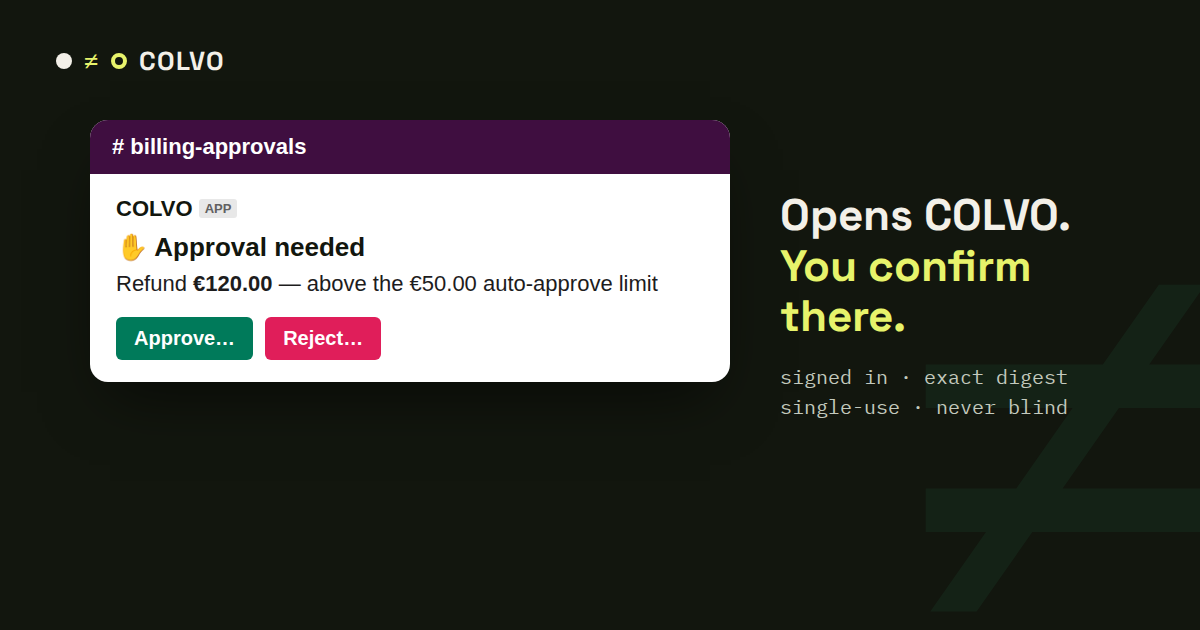
When Guard answers REVIEW — a €120 refund above the €50 auto-approve limit, say — a person has to decide. That person is usually in Slack, so that is where the request shows up.
What the message carries
Everything needed to judge it: the action, the amount, the customer, the payment, why it needs a human, the ticket and when the request expires. Two buttons: Approve… and Reject…
Why the buttons only open COLVO
Approving inside Slack would mean anyone who can see the channel — or a forwarded message — could move money. So the buttons are links. They open COLVO on that exact request with the confirmation already open; you sign in, check the digest and confirm. A forwarded link is useless without a COLVO login with the editor role, and every approval is single-use.
The channel stays honest
Every request gets a follow-up in the same channel: approved (and verified in Stripe), rejected with nothing sent, or expired. Nobody has to wonder whether the refund went out.
No Slack app to install
Because the buttons are links, the incoming webhook you already use for alerts is enough — no new permissions, no bot user.